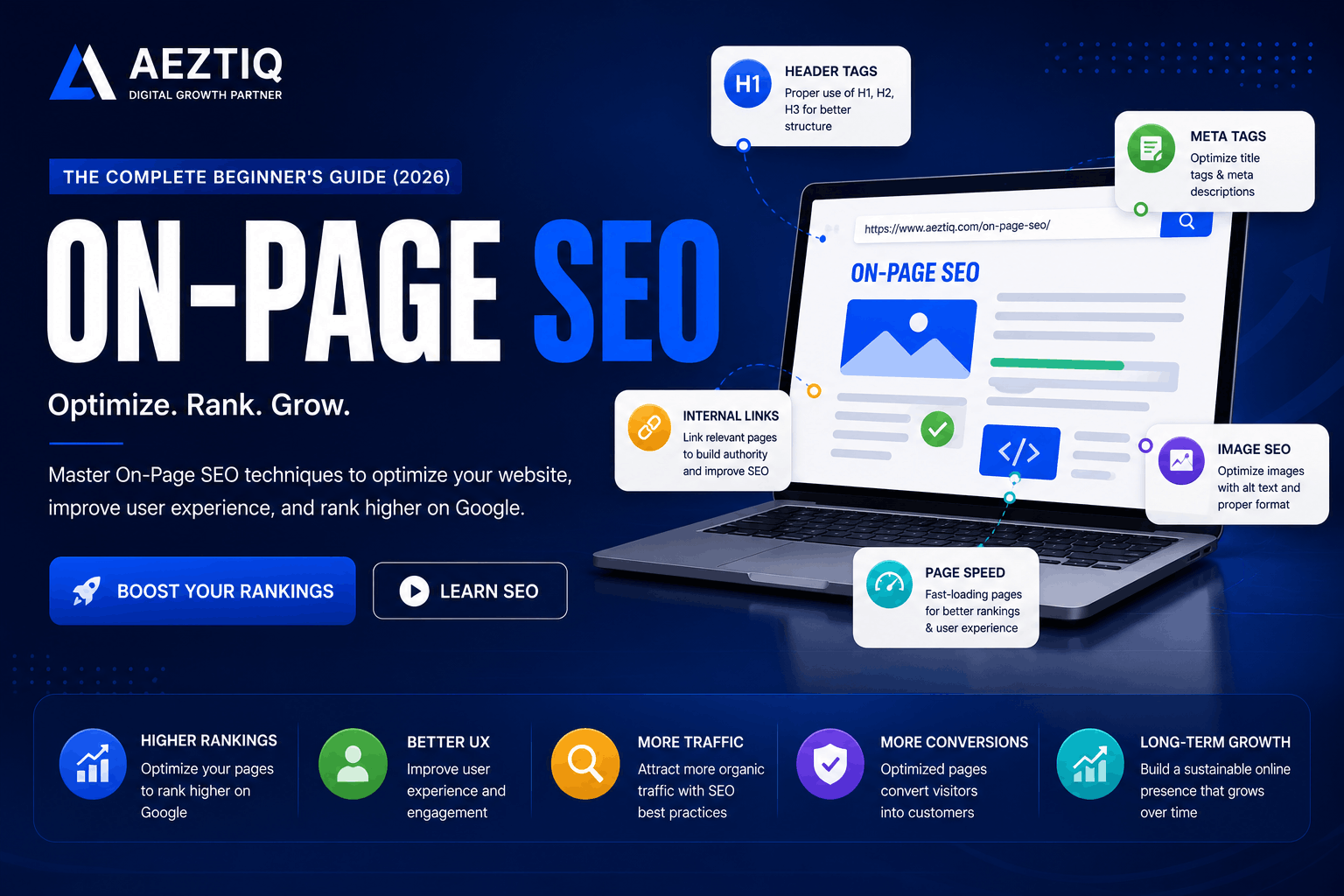
Learn the fundamentals of on-page SEO to improve rankings and user experience.
Picture two shops on the same street, selling the same products at the same prices. One always has customers walking in. The other sits mostly empty, even though nothing about the products themselves is worse.
Usually, the difference comes down to small things — a clear sign out front, products arranged so people can actually find what they want, helpful staff who point customers in the right direction. Websites work the same way, except the "shop front" is made of titles, headings, and how your content is structured.
That collection of details is what we call on-page SEO, and it's usually the single biggest reason two similar websites perform completely differently on Google.
This guide is part of our SEO Hub. If you haven't already, start with What Is SEO? and our keyword research guide — both pair naturally with everything covered here.
On-page SEO is the practice of optimizing individual web pages — titles, headings, content, images, and internal links — so both search engines and visitors clearly understand what the page is about.
Unlike backlinks or server configuration, every one of these elements lives directly inside the page itself. That makes this the most controllable part of SEO — there's no waiting on another website to link to you, no server configuration to untangle, no algorithm update to hope works in your favor.
It's also where most businesses lose easy wins, not because it's technically difficult, but because it's easy to overlook once a page "looks finished." A page can look polished to the person who built it while still being genuinely confusing to both a search engine and a first-time visitor.
In our own work reviewing client websites, this is consistently the single most common gap we find — not a lack of effort, but a lack of structure around effort that was already there.
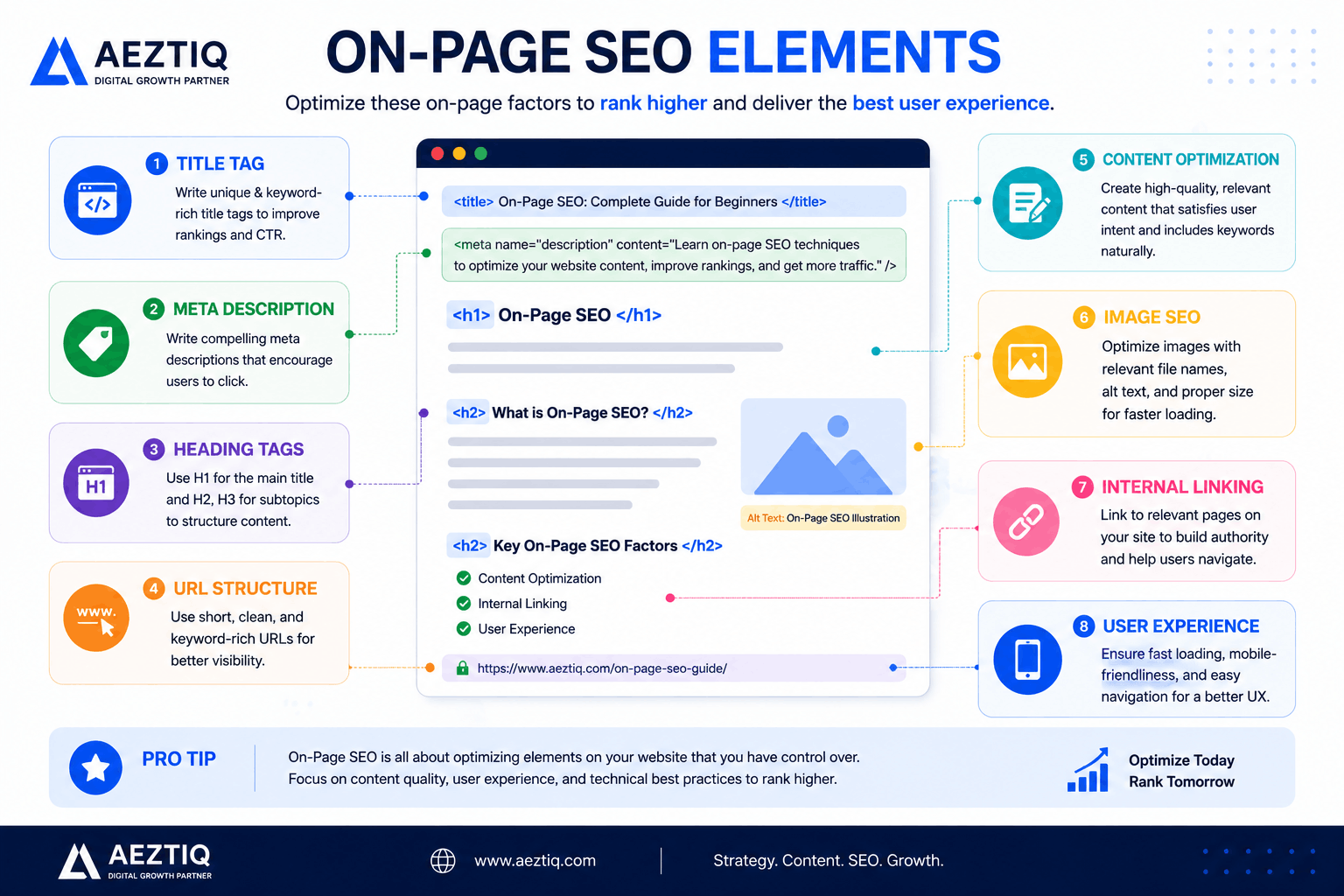
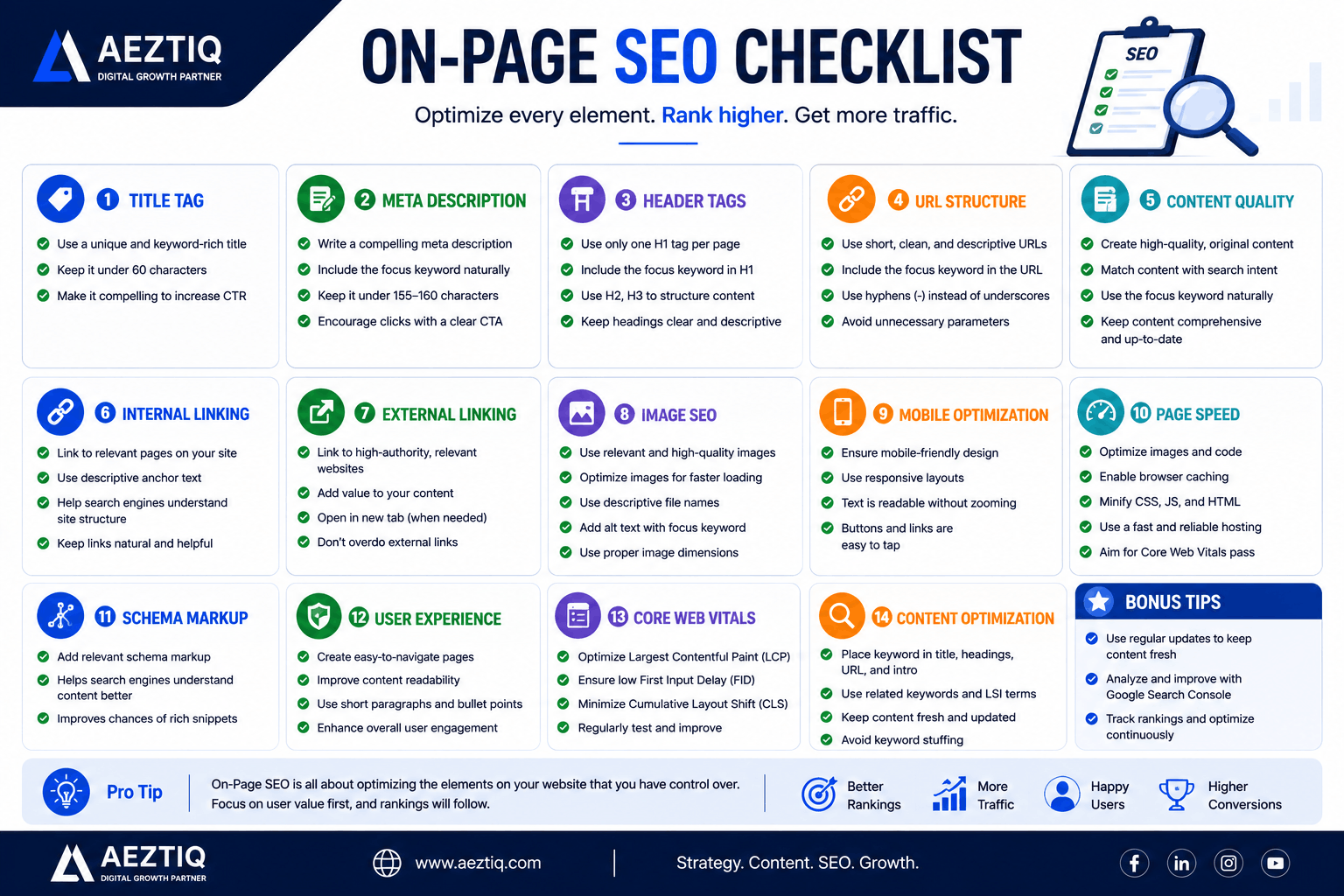
The essential elements that make up a well-optimized page.
Why It Matters
Search engines can't see a page the way a human does. They rely on structural signals — the title tag, the heading hierarchy, the words used, the way content is organized — to understand what a page is actually about and who it's genuinely useful for.
Get these signals wrong, and even excellent content can go unnoticed, buried behind pages that simply communicated their value more clearly. Get them right, and you've made it as easy as possible for both Google and real visitors to understand your page within the first few seconds of landing on it.
It's the fastest SEO win available. Most fixes take minutes, not months, unlike waiting for backlinks to accumulate naturally.
It directly affects click-through rate. A compelling title and description earn more clicks, even at the exact same ranking position as a competitor.
It supports every other SEO effort. Backlinks and technical fixes work far better on a properly structured page — a link pointing to a confusing, poorly organized page is worth less than the same link pointing to a clear one.
It compounds over time. A well-optimized page keeps earning search visibility for years, quietly working in the background long after it was published.
These two work together but focus on completely different things. One happens on your own pages, entirely within your control. The other happens everywhere else on the internet, and only partly within your control.
A common beginner mistake is investing heavily in one while neglecting the other entirely — chasing backlinks for a page that's poorly structured, or perfecting a page's structure while never building any external trust signals at all. The strongest results come from treating both as part of the same strategy, not competing priorities.
Aspect
On-Page
Off-Page
Where it happens
Directly on your website
External sites, backlinks, mentions
Who controls it
You, entirely
Partly outside your control
Example
Fixing a weak title tag
Earning a backlink from a news site
Timeframe to see results
Days to weeks
Weeks to months
On-Page vs Technical SEO
This distinction confuses a lot of beginners, understandably — the line between them can feel blurry. Technical SEO is about the site's infrastructure — how fast it loads, whether it's mobile-friendly, whether search engines can crawl and index it at all. The elements covered throughout this guide sit on top of that foundation, one layer closer to the actual reader.
In practice, we've seen businesses spend months perfecting page content while a slow server or broken mobile layout quietly capped their results the entire time. Checking both areas together, rather than treating them as separate projects handled by different people, tends to produce far better outcomes.
Pro TipThink of technical SEO as the road, and this guide's elements as the signage along it. A perfect road with no signs still confuses drivers — and a beautiful sign on a broken road doesn't help either. You need both working together.
Google Ranking Factors
Google has confirmed it uses hundreds of ranking signals, and the exact formula is private. But years of testing and Google's own statements have made the major ones clear:
Content quality and relevance — does the page thoroughly answer the search query, or just skim the surface of the topic? Google's systems have become noticeably better at telling the difference between genuinely useful content and content written mainly to fill a page.
Search intent match — does the content match what the searcher actually wants, whether that's a quick answer, a detailed comparison, or a place to buy something? A perfectly written page aimed at the wrong intent still struggles to rank.
Backlinks — how many quality, relevant sites link to the page, and how trustworthy are those sites themselves? A handful of genuine, relevant links typically outweighs dozens of low-quality ones.
Core Web Vitals — how fast and smooth is the page experience, covered in detail further down this guide.
Mobile-friendliness — does it work well on phones, where the majority of searches now happen, without requiring pinch-zooming or awkward scrolling.
Structured content — clear titles, headings, and organization that make both the topic and the page's structure obvious at a glance.
Notice that none of these exist in isolation. A page with brilliant content but terrible loading speed still underperforms, and a lightning-fast page with thin content rarely ranks either. This is exactly why on-page work matters as a complete system, not a single checkbox.
Title Tags
The clickable headline shown in search results. It should be clear, specific, and roughly 50-60 characters so it doesn't get cut off with an ellipsis mid-sentence.
A good title does two jobs at once: it tells search engines what the page covers, and it convinces a human scanning a results page that this particular result is worth clicking over the nine others on the same screen. Front-loading the most important words also helps, since some devices truncate titles more aggressively than others.
ExampleWeak: "Marketing Services" — Strong: "Digital Marketing Services in Kerala | AEZTIQ." The second one tells you exactly what it is and where, before you even click.
Meta Descriptions
The short summary shown beneath the title in search results, typically 150-160 characters. It doesn't directly affect rankings, but a compelling one meaningfully improves click-through rate — which indirectly helps rankings over time, since Google does pay attention to how often a result actually gets clicked.
Treat it like ad copy for your own content: a clear promise of what the reader will get, written in active language, without resorting to clickbait that the page itself can't deliver on.
Header Tags (H1, H2, H3)
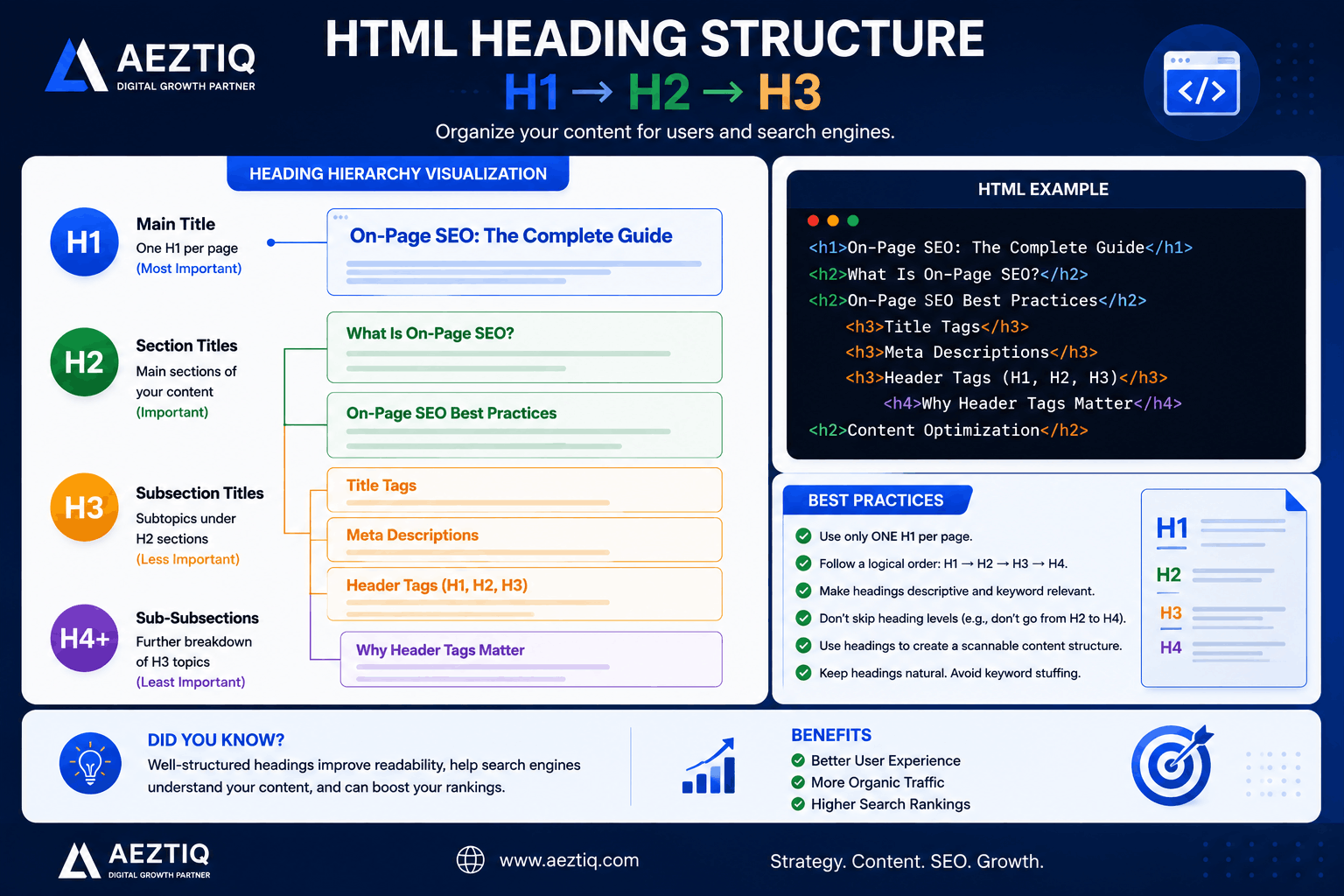
One clear H1 per page, with a logical structure of H2s and H3s underneath. This helps readers scan the page and helps search engines understand how the content is organized.
Important NoteNever skip heading levels just for visual styling — jumping from an H2 straight to an H4 confuses both screen readers and search engine crawlers about your page's actual structure.
Use proper heading hierarchy to improve readability and SEO.
Keyword Placement
Placing your target phrase naturally in the title, the opening paragraph, at least one heading, and a handful of times through the body helps both readers and search engines confirm what the page is about, without any single sentence feeling engineered.
The key word here is naturally. If a sentence sounds awkward just to fit the phrase in, rewrite the sentence instead of forcing it — search engines have gotten considerably better at recognizing content written for algorithms rather than people, and it rarely works in your favor anymore.
A useful mental model: write the page as if explaining the topic to a friend who asked you directly, then check afterward whether the key phrase appears where it naturally would in that explanation. Usually it does, without any extra effort.
Content Optimization
Genuinely useful, well-organized content that actually answers the reader's question will consistently outperform content stuffed with repeated phrases. Length matters less than depth — a focused 800-word answer often beats a padded 2,000-word one that dances around the topic.
Answer the core question early — don't make readers scroll through three paragraphs of preamble before getting to what they searched for.
Break up long sections with subheadings — this alone makes a page feel far less intimidating to a reader who's just scanning.
Use examples, not just abstract explanations — a single concrete example often communicates more than a paragraph of theory.
Update older content periodically rather than abandoning it once published — search engines do notice when content is kept current versus left stale for years.
One habit worth building: after writing, read the page as if you were the person who searched for it, not the person who wrote it. Does it actually deliver, or does it just sound like it does?
Internal Linking
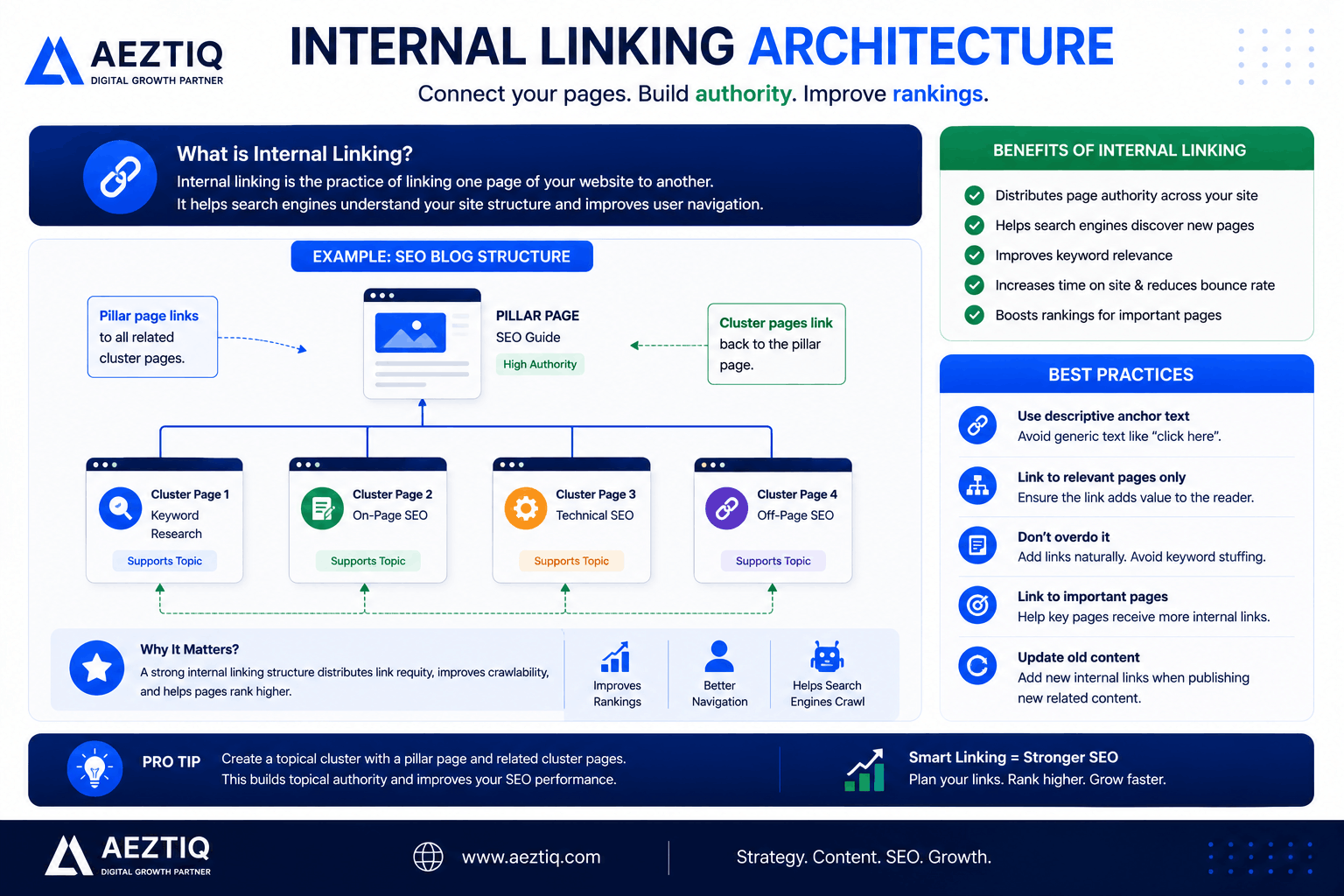
Linking to other relevant pages on your own site, using descriptive text rather than generic "click here" links, helps visitors explore further and helps search engines understand how your content connects together.
Think of internal links as a map you're drawing for both visitors and search engines simultaneously — every link is a vote that says "this related page is worth visiting too." Pages with no internal links pointing to them are effectively invisible corners of your own site, even if the content on them is genuinely good.
Common Slip-UpUsing "click here" as anchor text tells search engines nothing about the linked page. "See our SEO services" tells them exactly what's on the other end.
A strong internal linking structure improves crawling and rankings.
External Linking
Linking out to genuinely authoritative sources — official documentation, respected industry sites, original research — signals that your content is well-researched, not written in isolation from the rest of the web. It's a small trust signal that costs nothing to add, and it often genuinely helps the reader too.
The instinct many beginners have is to avoid external links entirely, worrying it "sends visitors away." In practice, thoughtfully placed external links to trustworthy sources tend to build more credibility than they cost in lost traffic — readers notice when a page is confident enough to point them toward real sources rather than keeping everything vague.
Image SEO
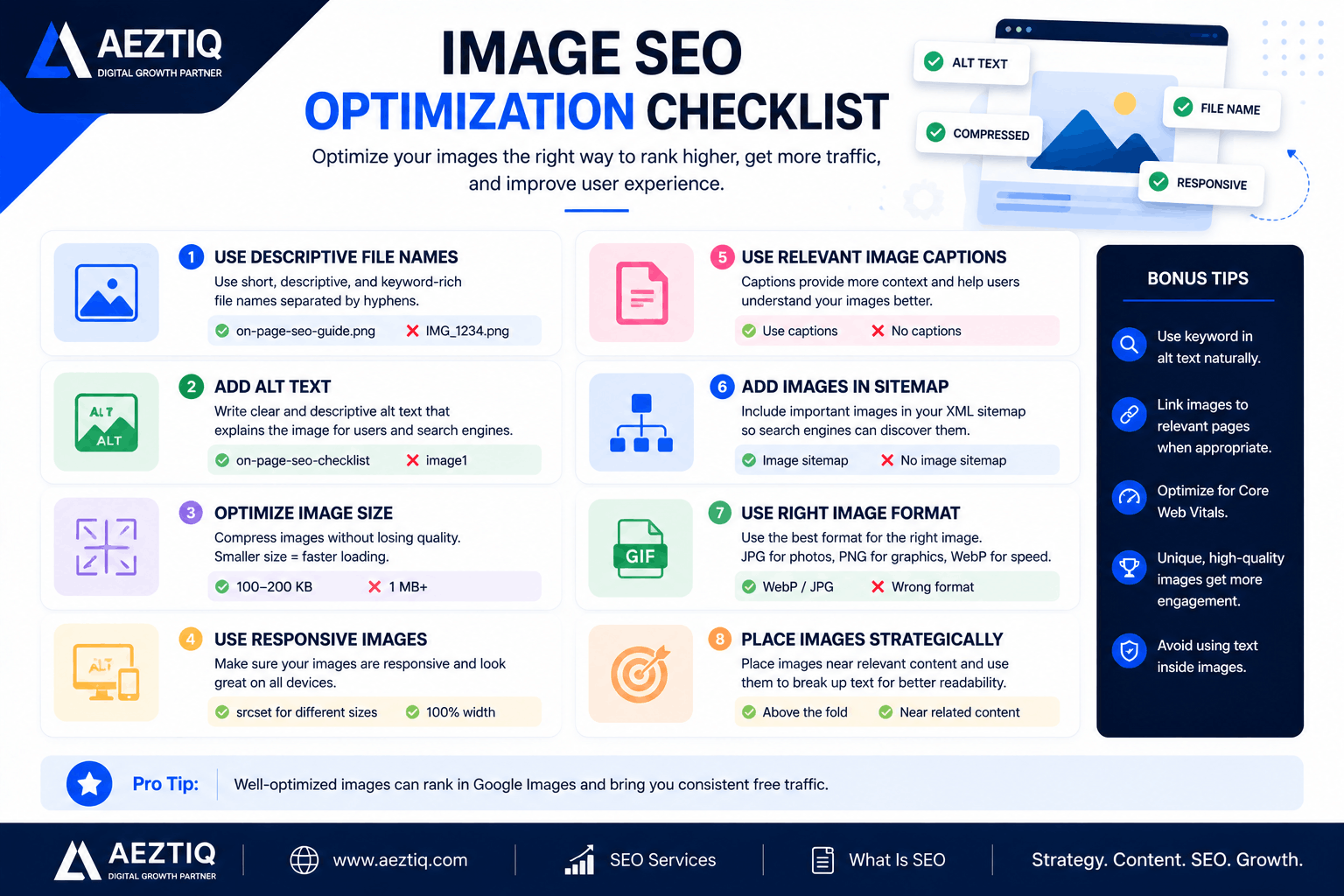
Images are part of on-page SEO too, and they're frequently the most neglected part of a page — treated as pure decoration rather than content search engines actually evaluate. Getting this right also matters for Google Image Search, which sends real traffic of its own for many businesses.
Image File Names
A file name like img_4821.jpg tells search engines nothing. on-page-seo-checklist.jpg tells them exactly what the image shows, before they've even "seen" it.
Alt Text
Alt text describes an image for search engines and for visually impaired visitors using screen readers. It should be descriptive and natural, not a place to cram extra keywords.
Follow these image SEO best practices for better rankings.
Schema is structured code added to a page that explicitly tells search engines what different pieces of content mean — a review, a recipe, a FAQ, an article, a local business. It's how pages sometimes earn star ratings, expandable FAQ sections, or event details directly in search results, rather than just a plain blue link.
A few schema types worth knowing, depending on your page type:
Article schema — for blog posts and guides, helping search engines identify the author, publish date, and headline.
FAQPage schema — for pages with question-and-answer content, which can unlock expandable FAQ dropdowns directly in search results.
LocalBusiness schema — for businesses with a physical location or service area, surfacing address, hours, and contact details.
Product schema — for e-commerce pages, enabling price, availability, and review star ratings to show up directly in search.
BreadcrumbList schema — showing the page's position in your site's structure directly in search results, which this very page uses.
You can validate your own schema using Schema.org's official reference, which lists every supported content type in full detail.
Core Web Vitals
Google's specific set of page experience metrics, measuring loading speed, interactivity, and visual stability. Google has confirmed these are a genuine ranking factor, alongside content relevance, and they're measured from real visitor data, not just lab tests.
Metric
What It Measures
Good Target
Largest Contentful Paint
How fast the main content loads
Under 2.5 seconds
Interaction to Next Paint
How quickly the page responds to clicks/taps
Under 200 milliseconds
Cumulative Layout Shift
How much the page visually jumps around while loading
Under 0.1
You can check your own scores using PageSpeed Insights or Google Lighthouse, both free and run directly by Google. Neither requires any technical setup — just paste in a URL and wait a few seconds.
Page Speed
A slow page loses visitors before they ever see your content, regardless of how good it is. Studies on visitor behavior consistently show that even a one or two-second delay measurably increases how often people leave before the page finishes loading.
Compress and properly size images before uploading, rather than letting the browser scale down a huge file
Minimize unnecessary scripts and plugins that aren't actually doing anything for the page
Use decent hosting — a cheap, overcrowded server undermines every other optimization you make
Enable caching so returning visitors don't reload everything from scratch
Mobile Friendliness
Most searches now happen on phones. A site that isn't genuinely comfortable to use on a small screen is fighting with one hand tied behind its back, regardless of how polished it looks on desktop.
This goes beyond just "does it fit the screen." Buttons need to be large enough to tap accurately, text needs to be readable without zooming, and menus need to work with a thumb, not a mouse cursor. Google also primarily uses the mobile version of a page for indexing and ranking, not the desktop version — so a mobile experience that's an afterthought is a genuine liability, not just a minor inconvenience.
User Experience
If visitors land on a page and leave immediately, that's a signal search engines notice over time, even if it's not a single explicit ranking factor on its own. Clear navigation, readable text size, and content that delivers on what the title promised all matter more than any single technical tweak.
A useful gut-check: would you personally enjoy reading this page on your own phone, in bright sunlight, in a hurry? If the honest answer is no, that's worth fixing before worrying about anything more advanced.
Common Mistakes
❌ Repeating the Same Phrase Too OftenForcing the same words into every sentence reads poorly and can look manipulative to search engines rather than helpful. If a paragraph sounds unnatural when read aloud, that's usually a sign it's been over-optimized.
❌ Duplicate Titles Across PagesEvery page needs its own distinct, descriptive title — copy-pasting the same one everywhere confuses readers and search engines alike about which page actually covers what.
❌ Skipping Alt TextLeaving images without any description misses an easy win and hurts accessibility for visually impaired visitors using screen readers, who rely entirely on that text to understand the image.
❌ Walls of Unbroken TextLong paragraphs with no headings or breaks are hard to scan, and most readers simply leave rather than commit to reading a dense block of text.
❌ No Internal Links at AllPages that never link anywhere else on the site strand visitors and waste an easy opportunity to guide them toward related content they'd genuinely find useful.
❌ Ignoring Page SpeedA slow-loading page loses visitors — and Google's patience — before your excellent content even gets a chance to be read.
The Complete Checklist
Run through this list on any page before hitting publish, or use it as an audit tool on pages you've already published. Most pages fail on at least two or three items here, and fixing them is usually faster than writing the original content was.
Write a unique, descriptive title under 60 characters
Write a compelling meta description
Use one clear H1, with a logical H2/H3 structure below it
Place your target phrase naturally, not forced
Add descriptive alt text and file names to every image
Link to relevant pages using descriptive anchor text
Add schema markup where relevant
Check Core Web Vitals and page speed scores
Confirm the page works well on mobile
Make sure the content actually answers the reader's question
Complete this checklist before publishing any page.
Once your pages are structured properly, the next steps in this series cover technical SEO, off-page SEO, local SEO, schema markup in more depth, and dedicated SEO tools comparisons — all coming soon in this hub.
Need help optimizing your website? Contact AEZTIQ for professional SEO services.
Frequently Asked Questions
What does this actually mean, in simple terms?
It's everything you optimize directly on your own web pages — titles, headings, content, images, and internal links — so search engines and visitors both understand what the page is about.
Is this enough to rank on Google by itself?
Usually not alone. It works alongside technical SEO and off-page factors like backlinks, but it gives you the strongest possible foundation to build everything else on.
What's the ideal title tag length?
Roughly 50-60 characters, so it doesn't get cut off in search results.
Do Core Web Vitals really affect rankings?
Yes, Google has confirmed page experience signals including Core Web Vitals are a ranking factor, though content relevance still matters far more.
How many internal links should one page have?
There's no fixed number. The right amount is however many genuinely help a reader find related, useful content on your site.
Does image file naming actually matter for SEO?
Yes. A descriptive file name gives search engines another signal about what the image shows, which matters for both regular and image search rankings.
Can over-optimizing a page hurt rankings?
Yes. Keyword stuffing, unnatural anchor text, and forced repetition can look manipulative to search engines and often backfire rather than help.
Conclusion
None of this requires special tools or deep technical skill — just attention to details that are easy to overlook once a page "feels done." A clear title, a logical heading structure, thoughtful internal links, fast loading times, and content that genuinely answers the question in front of it.
We've reviewed pages that had excellent, accurate content sitting behind a vague title, a missing meta description, and zero internal links to anywhere else on the site — quietly invisible despite the effort that clearly went into writing them. Fixing just those three things, without touching a single word of the actual content, was often enough to see a measurable shift in visibility within weeks.
Start with your homepage or your most important service page. Review it against the checklist above, fix what's missing, and you'll likely find real, fixable gaps within the first ten minutes.
Let AEZTIQ Optimize Your Website Properly
From individual page fixes to a complete SEO overhaul, AEZTIQ helps businesses turn overlooked pages into pages that actually rank.
Specializes in SEO, content marketing, WordPress, and GA4 — helping students and businesses build pages that are genuinely structured to rank, not just written well.
Learn the fundamentals of on-page SEO to improve rankings and user experience.
Picture two shops on the same street, selling the same products at the same prices. One always has customers walking in. The other sits mostly empty, even though nothing about the products themselves is worse.
Usually, the difference comes down to small things — a clear sign out front, products arranged so people can actually find what they want, helpful staff who point customers in the right direction. Websites work the same way, except the "shop front" is made of titles, headings, and how your content is structured.
That collection of details is what we call on-page SEO, and it's usually the single biggest reason two similar websites perform completely differently on Google.
This guide is part of our SEO Hub. If you haven't already, start with What Is SEO? and our keyword research guide — both pair naturally with everything covered here.
On-page SEO is the practice of optimizing individual web pages — titles, headings, content, images, and internal links — so both search engines and visitors clearly understand what the page is about.
Unlike backlinks or server configuration, every one of these elements lives directly inside the page itself. That makes this the most controllable part of SEO — there's no waiting on another website to link to you, no server configuration to untangle, no algorithm update to hope works in your favor.
It's also where most businesses lose easy wins, not because it's technically difficult, but because it's easy to overlook once a page "looks finished." A page can look polished to the person who built it while still being genuinely confusing to both a search engine and a first-time visitor.
In our own work reviewing client websites, this is consistently the single most common gap we find — not a lack of effort, but a lack of structure around effort that was already there.
The essential elements that make up a well-optimized page.
Why It Matters
Search engines can't see a page the way a human does. They rely on structural signals — the title tag, the heading hierarchy, the words used, the way content is organized — to understand what a page is actually about and who it's genuinely useful for.
Get these signals wrong, and even excellent content can go unnoticed, buried behind pages that simply communicated their value more clearly. Get them right, and you've made it as easy as possible for both Google and real visitors to understand your page within the first few seconds of landing on it.
It's the fastest SEO win available. Most fixes take minutes, not months, unlike waiting for backlinks to accumulate naturally.
It directly affects click-through rate. A compelling title and description earn more clicks, even at the exact same ranking position as a competitor.
It supports every other SEO effort. Backlinks and technical fixes work far better on a properly structured page — a link pointing to a confusing, poorly organized page is worth less than the same link pointing to a clear one.
It compounds over time. A well-optimized page keeps earning search visibility for years, quietly working in the background long after it was published.
These two work together but focus on completely different things. One happens on your own pages, entirely within your control. The other happens everywhere else on the internet, and only partly within your control.
A common beginner mistake is investing heavily in one while neglecting the other entirely — chasing backlinks for a page that's poorly structured, or perfecting a page's structure while never building any external trust signals at all. The strongest results come from treating both as part of the same strategy, not competing priorities.
Aspect
On-Page
Off-Page
Where it happens
Directly on your website
External sites, backlinks, mentions
Who controls it
You, entirely
Partly outside your control
Example
Fixing a weak title tag
Earning a backlink from a news site
Timeframe to see results
Days to weeks
Weeks to months
On-Page vs Technical SEO
This distinction confuses a lot of beginners, understandably — the line between them can feel blurry. Technical SEO is about the site's infrastructure — how fast it loads, whether it's mobile-friendly, whether search engines can crawl and index it at all. The elements covered throughout this guide sit on top of that foundation, one layer closer to the actual reader.
In practice, we've seen businesses spend months perfecting page content while a slow server or broken mobile layout quietly capped their results the entire time. Checking both areas together, rather than treating them as separate projects handled by different people, tends to produce far better outcomes.
Pro TipThink of technical SEO as the road, and this guide's elements as the signage along it. A perfect road with no signs still confuses drivers — and a beautiful sign on a broken road doesn't help either. You need both working together.
Google Ranking Factors
Google has confirmed it uses hundreds of ranking signals, and the exact formula is private. But years of testing and Google's own statements have made the major ones clear:
Content quality and relevance — does the page thoroughly answer the search query, or just skim the surface of the topic? Google's systems have become noticeably better at telling the difference between genuinely useful content and content written mainly to fill a page.
Search intent match — does the content match what the searcher actually wants, whether that's a quick answer, a detailed comparison, or a place to buy something? A perfectly written page aimed at the wrong intent still struggles to rank.
Backlinks — how many quality, relevant sites link to the page, and how trustworthy are those sites themselves? A handful of genuine, relevant links typically outweighs dozens of low-quality ones.
Core Web Vitals — how fast and smooth is the page experience, covered in detail further down this guide.
Mobile-friendliness — does it work well on phones, where the majority of searches now happen, without requiring pinch-zooming or awkward scrolling.
Structured content — clear titles, headings, and organization that make both the topic and the page's structure obvious at a glance.
Notice that none of these exist in isolation. A page with brilliant content but terrible loading speed still underperforms, and a lightning-fast page with thin content rarely ranks either. This is exactly why on-page work matters as a complete system, not a single checkbox.
Title Tags
The clickable headline shown in search results. It should be clear, specific, and roughly 50-60 characters so it doesn't get cut off with an ellipsis mid-sentence.
A good title does two jobs at once: it tells search engines what the page covers, and it convinces a human scanning a results page that this particular result is worth clicking over the nine others on the same screen. Front-loading the most important words also helps, since some devices truncate titles more aggressively than others.
ExampleWeak: "Marketing Services" — Strong: "Digital Marketing Services in Kerala | AEZTIQ." The second one tells you exactly what it is and where, before you even click.
Meta Descriptions
The short summary shown beneath the title in search results, typically 150-160 characters. It doesn't directly affect rankings, but a compelling one meaningfully improves click-through rate — which indirectly helps rankings over time, since Google does pay attention to how often a result actually gets clicked.
Treat it like ad copy for your own content: a clear promise of what the reader will get, written in active language, without resorting to clickbait that the page itself can't deliver on.
Header Tags (H1, H2, H3)
One clear H1 per page, with a logical structure of H2s and H3s underneath. This helps readers scan the page and helps search engines understand how the content is organized.
Important NoteNever skip heading levels just for visual styling — jumping from an H2 straight to an H4 confuses both screen readers and search engine crawlers about your page's actual structure.
Use proper heading hierarchy to improve readability and SEO.
Keyword Placement
Placing your target phrase naturally in the title, the opening paragraph, at least one heading, and a handful of times through the body helps both readers and search engines confirm what the page is about, without any single sentence feeling engineered.
The key word here is naturally. If a sentence sounds awkward just to fit the phrase in, rewrite the sentence instead of forcing it — search engines have gotten considerably better at recognizing content written for algorithms rather than people, and it rarely works in your favor anymore.
A useful mental model: write the page as if explaining the topic to a friend who asked you directly, then check afterward whether the key phrase appears where it naturally would in that explanation. Usually it does, without any extra effort.
Content Optimization
Genuinely useful, well-organized content that actually answers the reader's question will consistently outperform content stuffed with repeated phrases. Length matters less than depth — a focused 800-word answer often beats a padded 2,000-word one that dances around the topic.
Answer the core question early — don't make readers scroll through three paragraphs of preamble before getting to what they searched for.
Break up long sections with subheadings — this alone makes a page feel far less intimidating to a reader who's just scanning.
Use examples, not just abstract explanations — a single concrete example often communicates more than a paragraph of theory.
Update older content periodically rather than abandoning it once published — search engines do notice when content is kept current versus left stale for years.
One habit worth building: after writing, read the page as if you were the person who searched for it, not the person who wrote it. Does it actually deliver, or does it just sound like it does?
Internal Linking
Linking to other relevant pages on your own site, using descriptive text rather than generic "click here" links, helps visitors explore further and helps search engines understand how your content connects together.
Think of internal links as a map you're drawing for both visitors and search engines simultaneously — every link is a vote that says "this related page is worth visiting too." Pages with no internal links pointing to them are effectively invisible corners of your own site, even if the content on them is genuinely good.
Common Slip-UpUsing "click here" as anchor text tells search engines nothing about the linked page. "See our SEO services" tells them exactly what's on the other end.
A strong internal linking structure improves crawling and rankings.
External Linking
Linking out to genuinely authoritative sources — official documentation, respected industry sites, original research — signals that your content is well-researched, not written in isolation from the rest of the web. It's a small trust signal that costs nothing to add, and it often genuinely helps the reader too.
The instinct many beginners have is to avoid external links entirely, worrying it "sends visitors away." In practice, thoughtfully placed external links to trustworthy sources tend to build more credibility than they cost in lost traffic — readers notice when a page is confident enough to point them toward real sources rather than keeping everything vague.
Image SEO
Images are part of on-page SEO too, and they're frequently the most neglected part of a page — treated as pure decoration rather than content search engines actually evaluate. Getting this right also matters for Google Image Search, which sends real traffic of its own for many businesses.
Image File Names
A file name like img_4821.jpg tells search engines nothing. on-page-seo-checklist.jpg tells them exactly what the image shows, before they've even "seen" it.
Alt Text
Alt text describes an image for search engines and for visually impaired visitors using screen readers. It should be descriptive and natural, not a place to cram extra keywords.
Follow these image SEO best practices for better rankings.
Schema is structured code added to a page that explicitly tells search engines what different pieces of content mean — a review, a recipe, a FAQ, an article, a local business. It's how pages sometimes earn star ratings, expandable FAQ sections, or event details directly in search results, rather than just a plain blue link.
A few schema types worth knowing, depending on your page type:
Article schema — for blog posts and guides, helping search engines identify the author, publish date, and headline.
FAQPage schema — for pages with question-and-answer content, which can unlock expandable FAQ dropdowns directly in search results.
LocalBusiness schema — for businesses with a physical location or service area, surfacing address, hours, and contact details.
Product schema — for e-commerce pages, enabling price, availability, and review star ratings to show up directly in search.
BreadcrumbList schema — showing the page's position in your site's structure directly in search results, which this very page uses.
You can validate your own schema using Schema.org's official reference, which lists every supported content type in full detail.
Core Web Vitals
Google's specific set of page experience metrics, measuring loading speed, interactivity, and visual stability. Google has confirmed these are a genuine ranking factor, alongside content relevance, and they're measured from real visitor data, not just lab tests.
Metric
What It Measures
Good Target
Largest Contentful Paint
How fast the main content loads
Under 2.5 seconds
Interaction to Next Paint
How quickly the page responds to clicks/taps
Under 200 milliseconds
Cumulative Layout Shift
How much the page visually jumps around while loading
Under 0.1
You can check your own scores using PageSpeed Insights or Google Lighthouse, both free and run directly by Google. Neither requires any technical setup — just paste in a URL and wait a few seconds.
Page Speed
A slow page loses visitors before they ever see your content, regardless of how good it is. Studies on visitor behavior consistently show that even a one or two-second delay measurably increases how often people leave before the page finishes loading.
Compress and properly size images before uploading, rather than letting the browser scale down a huge file
Minimize unnecessary scripts and plugins that aren't actually doing anything for the page
Use decent hosting — a cheap, overcrowded server undermines every other optimization you make
Enable caching so returning visitors don't reload everything from scratch
Mobile Friendliness
Most searches now happen on phones. A site that isn't genuinely comfortable to use on a small screen is fighting with one hand tied behind its back, regardless of how polished it looks on desktop.
This goes beyond just "does it fit the screen." Buttons need to be large enough to tap accurately, text needs to be readable without zooming, and menus need to work with a thumb, not a mouse cursor. Google also primarily uses the mobile version of a page for indexing and ranking, not the desktop version — so a mobile experience that's an afterthought is a genuine liability, not just a minor inconvenience.
User Experience
If visitors land on a page and leave immediately, that's a signal search engines notice over time, even if it's not a single explicit ranking factor on its own. Clear navigation, readable text size, and content that delivers on what the title promised all matter more than any single technical tweak.
A useful gut-check: would you personally enjoy reading this page on your own phone, in bright sunlight, in a hurry? If the honest answer is no, that's worth fixing before worrying about anything more advanced.
Common Mistakes
❌ Repeating the Same Phrase Too OftenForcing the same words into every sentence reads poorly and can look manipulative to search engines rather than helpful. If a paragraph sounds unnatural when read aloud, that's usually a sign it's been over-optimized.
❌ Duplicate Titles Across PagesEvery page needs its own distinct, descriptive title — copy-pasting the same one everywhere confuses readers and search engines alike about which page actually covers what.
❌ Skipping Alt TextLeaving images without any description misses an easy win and hurts accessibility for visually impaired visitors using screen readers, who rely entirely on that text to understand the image.
❌ Walls of Unbroken TextLong paragraphs with no headings or breaks are hard to scan, and most readers simply leave rather than commit to reading a dense block of text.
❌ No Internal Links at AllPages that never link anywhere else on the site strand visitors and waste an easy opportunity to guide them toward related content they'd genuinely find useful.
❌ Ignoring Page SpeedA slow-loading page loses visitors — and Google's patience — before your excellent content even gets a chance to be read.
The Complete Checklist
Run through this list on any page before hitting publish, or use it as an audit tool on pages you've already published. Most pages fail on at least two or three items here, and fixing them is usually faster than writing the original content was.
Write a unique, descriptive title under 60 characters
Write a compelling meta description
Use one clear H1, with a logical H2/H3 structure below it
Place your target phrase naturally, not forced
Add descriptive alt text and file names to every image
Link to relevant pages using descriptive anchor text
Add schema markup where relevant
Check Core Web Vitals and page speed scores
Confirm the page works well on mobile
Make sure the content actually answers the reader's question
Complete this checklist before publishing any page.
Once your pages are structured properly, the next steps in this series cover technical SEO, off-page SEO, local SEO, schema markup in more depth, and dedicated SEO tools comparisons — all coming soon in this hub.
Need help optimizing your website? Contact AEZTIQ for professional SEO services.
Frequently Asked Questions
What does this actually mean, in simple terms?
It's everything you optimize directly on your own web pages — titles, headings, content, images, and internal links — so search engines and visitors both understand what the page is about.
Is this enough to rank on Google by itself?
Usually not alone. It works alongside technical SEO and off-page factors like backlinks, but it gives you the strongest possible foundation to build everything else on.
What's the ideal title tag length?
Roughly 50-60 characters, so it doesn't get cut off in search results.
Do Core Web Vitals really affect rankings?
Yes, Google has confirmed page experience signals including Core Web Vitals are a ranking factor, though content relevance still matters far more.
How many internal links should one page have?
There's no fixed number. The right amount is however many genuinely help a reader find related, useful content on your site.
Does image file naming actually matter for SEO?
Yes. A descriptive file name gives search engines another signal about what the image shows, which matters for both regular and image search rankings.
Can over-optimizing a page hurt rankings?
Yes. Keyword stuffing, unnatural anchor text, and forced repetition can look manipulative to search engines and often backfire rather than help.
Conclusion
None of this requires special tools or deep technical skill — just attention to details that are easy to overlook once a page "feels done." A clear title, a logical heading structure, thoughtful internal links, fast loading times, and content that genuinely answers the question in front of it.
We've reviewed pages that had excellent, accurate content sitting behind a vague title, a missing meta description, and zero internal links to anywhere else on the site — quietly invisible despite the effort that clearly went into writing them. Fixing just those three things, without touching a single word of the actual content, was often enough to see a measurable shift in visibility within weeks.
Start with your homepage or your most important service page. Review it against the checklist above, fix what's missing, and you'll likely find real, fixable gaps within the first ten minutes.
Let AEZTIQ Optimize Your Website Properly
From individual page fixes to a complete SEO overhaul, AEZTIQ helps businesses turn overlooked pages into pages that actually rank.
Specializes in SEO, content marketing, WordPress, and GA4 — helping students and businesses build pages that are genuinely structured to rank, not just written well.