Type a question into Google, and within half a second you have ten answers waiting for you. Ever wondered why some websites show up on that first page and others — sometimes with better products or more useful information — are buried on page seven where almost nobody ever looks?
The answer is SEO.
If you've just started hearing this term thrown around by marketers, business owners, or that one friend who "does websites," this guide is for you. No jargon, no assumed knowledge. By the end, you'll actually understand what SEO is, how it works, and what you personally need to do to get your website noticed.
Table of Contents
What Is SEO?
Think of it like this: if the internet were a massive library with billions of books, SEO is what makes sure your book isn't just sitting on a shelf somewhere — it's the first one the librarian hands to someone asking the right question.
Every time someone searches for something on Google, an algorithm scans through billions of pages and picks what it believes are the most relevant, trustworthy, and useful results. SEO is the set of practices that helps your page qualify as one of those results.
It's not a trick or a loophole. Good SEO is really just making your website genuinely easier to find, easier to use, and more useful than the alternatives — and then communicating that clearly to search engines.
If you'd rather have this handled by professionals than piece it together yourself, take a look at AEZTIQ's SEO services — the same process explained in this guide, done for you.
Why Is SEO Important?
Here's the practical reality: when someone searches "best digital marketing course near me" or "affordable plumber in Kochi," they're not casually browsing — they already have intent. They're looking to buy, learn, or hire. If your website shows up at that exact moment, you're reaching someone who's already interested. That's fundamentally different from interrupting someone's Instagram scroll with an ad.
A few reasons SEO deserves your attention:
- It builds long-term, compounding value. A well-optimized page can keep bringing traffic for years, unlike a paid ad that stops the second your budget runs out.
- It builds trust. Most people trust organic results more than ads — ranking naturally signals credibility.
- It's cost-effective over time. The upfront work is real, but you're not paying per click forever.
- It improves overall user experience, which helps conversions regardless of where traffic comes from.
That said, SEO isn't magic, and it isn't instant. It's a genuine investment of time and effort that pays off gradually — which is exactly why so many businesses give up too early, right before it starts working.
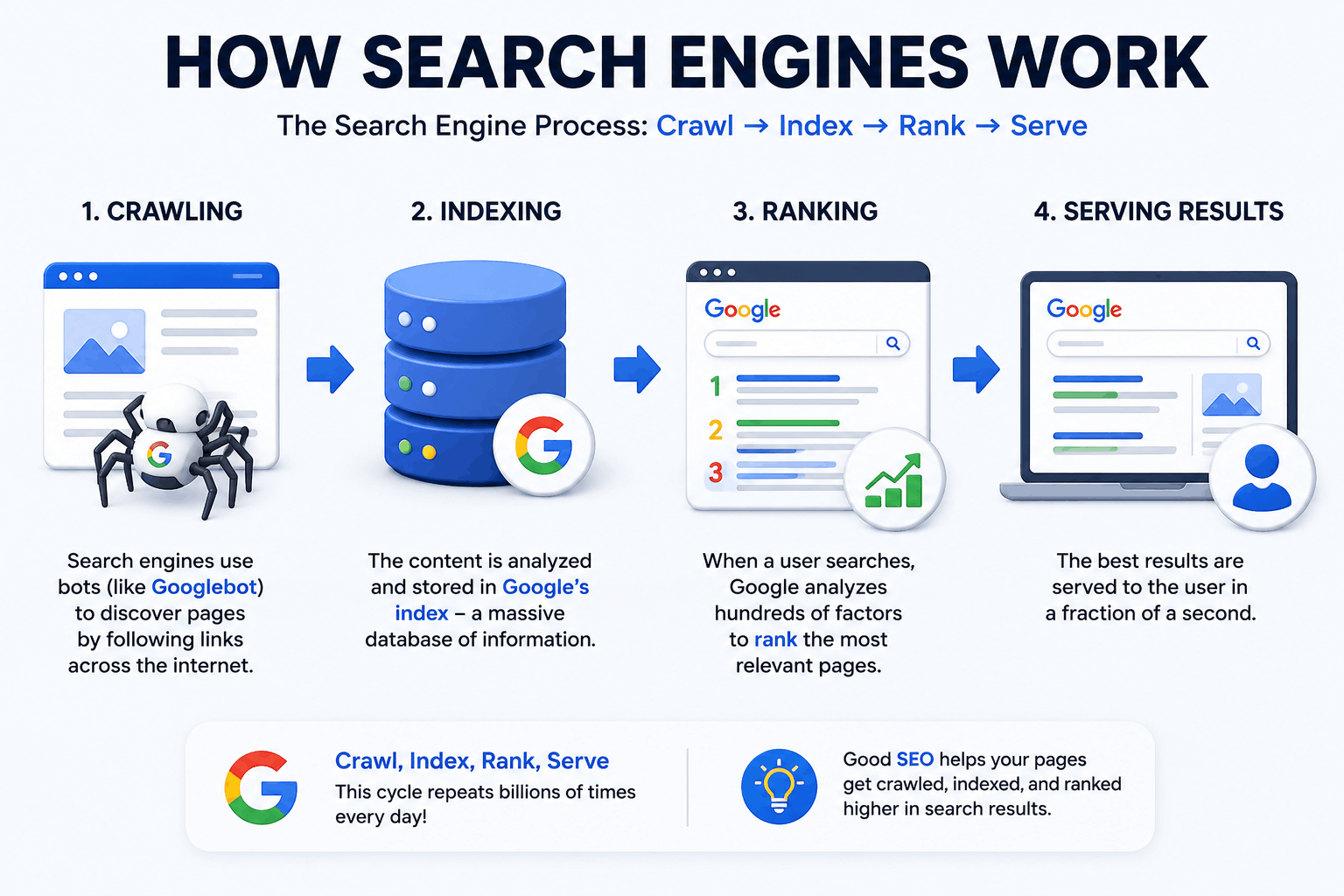
How Search Engines Work
Crawling
Google uses automated programs called "crawlers" or "spiders" (the main one is called Googlebot) that constantly travel across the internet, following links from page to page, discovering new and updated content.
Think of crawling like a postal worker walking down every street in a city, checking every mailbox to see what's new. If your website has no links pointing to it and isn't submitted anywhere, the crawler might simply never find your street.
Indexing
Once a page is crawled, Google tries to understand what it's actually about — the topic, the structure, the images, the words used — and stores that information in a massive database called the index. This is essentially Google's enormous filing system of every page it knows about.
If a page isn't indexed, it cannot appear in search results at all, no matter how good your SEO is. This is why checking your indexing status in Google Search Console is one of the very first things any website owner should do.
Ranking
Finally, when someone actually types a search query, Google's ranking algorithm scans through the relevant indexed pages and decides — in a fraction of a second — which ones deserve to appear, and in what order. This decision is based on hundreds of factors, which we'll get into shortly.
| Stage | What Happens | Why It Matters |
|---|---|---|
| Crawling | Google discovers your page | If it's never found, nothing else matters |
| Indexing | Google stores and understands your page | If it's not indexed, it can't rank |
| Ranking | Google decides where to place your page | This determines your actual visibility |
Types of SEO
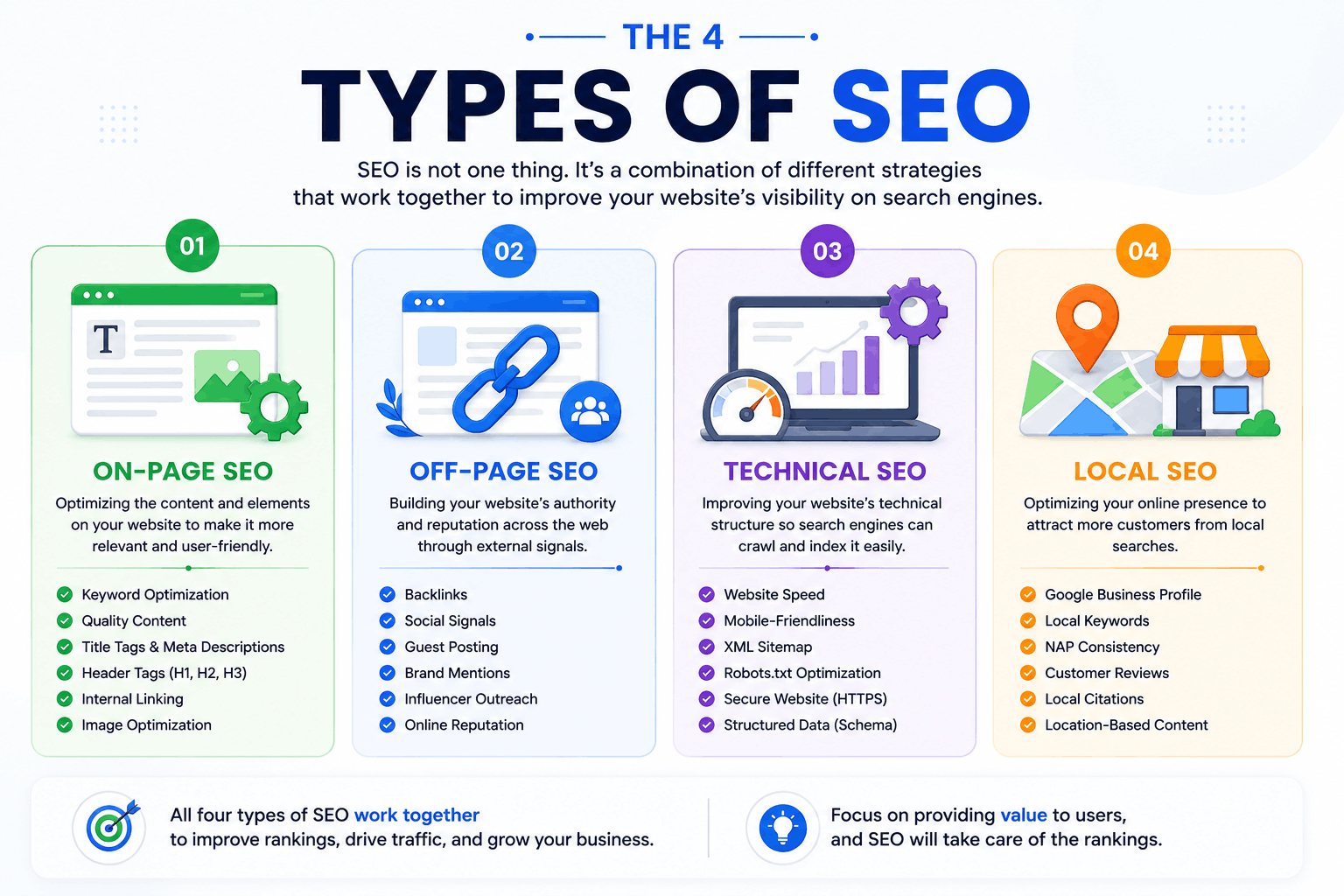
SEO isn't one single activity — it's a combination of different disciplines working together. Here are the four main types every beginner should know.
On-Page SEO
- Writing clear, keyword-relevant titles and meta descriptions
- Structuring content with proper headings (H1, H2, H3)
- Adding descriptive image alt text
- Internal linking between related pages on your own site
- Making sure your content actually, genuinely answers the searcher's question
Off-Page SEO
Search engines treat a link from another website as a kind of vote of confidence. The more relevant, trustworthy sites that link to you, the more Google tends to trust your site too.
Technical SEO
This is the part beginners often skip because it's less visible than writing content — but a beautifully written page that loads slowly or breaks on mobile can still struggle to rank.
Core Web Vitals — Google's specific set of page experience metrics measuring loading speed, interactivity, and visual stability — fall under this category, and they've become increasingly important in recent years.
Local SEO
This mainly revolves around your Google Business Profile, local citations, location-specific keywords, and customer reviews. If you've ever searched "coffee shop near me," you've directly experienced local SEO in action.
| Type | Focus Area | Example Action |
|---|---|---|
| On-Page SEO | Your own content and structure | Optimizing a blog post's headings |
| Off-Page SEO | External trust signals | Earning a backlink from a news site |
| Technical SEO | Site infrastructure | Improving page load speed |
| Local SEO | Geographic visibility | Optimizing your Google Business Profile |
Need Professional Digital Marketing Help?
🚀 Get Free ConsultationHow Google Ranks Websites
Google doesn't rank websites — it ranks individual pages based on how well they match a specific search query. The algorithm considers relevance, quality, user experience, and trustworthiness together, not any single factor in isolation.
Google has publicly stated it uses hundreds of ranking signals, and the exact formula is a closely guarded secret that changes constantly. But the underlying philosophy has stayed consistent for years: reward content that is genuinely helpful, created for real people (not just search engines), and demonstrates real expertise and trustworthiness.
This is where EEAT comes in — a framework Google's own quality evaluators use, standing for:
- Experience — Does the content show real, first-hand experience with the topic?
- Expertise — Does the creator have genuine knowledge or skill in this area?
- Authoritativeness — Is the source recognized as credible in its field?
- Trustworthiness — Is the information accurate, transparent, and safe to rely on?
This is exactly why generic, copy-pasted content struggles to rank in 2026 — Google's systems have gotten much better at recognizing genuinely helpful content versus content mass-produced purely to rank.
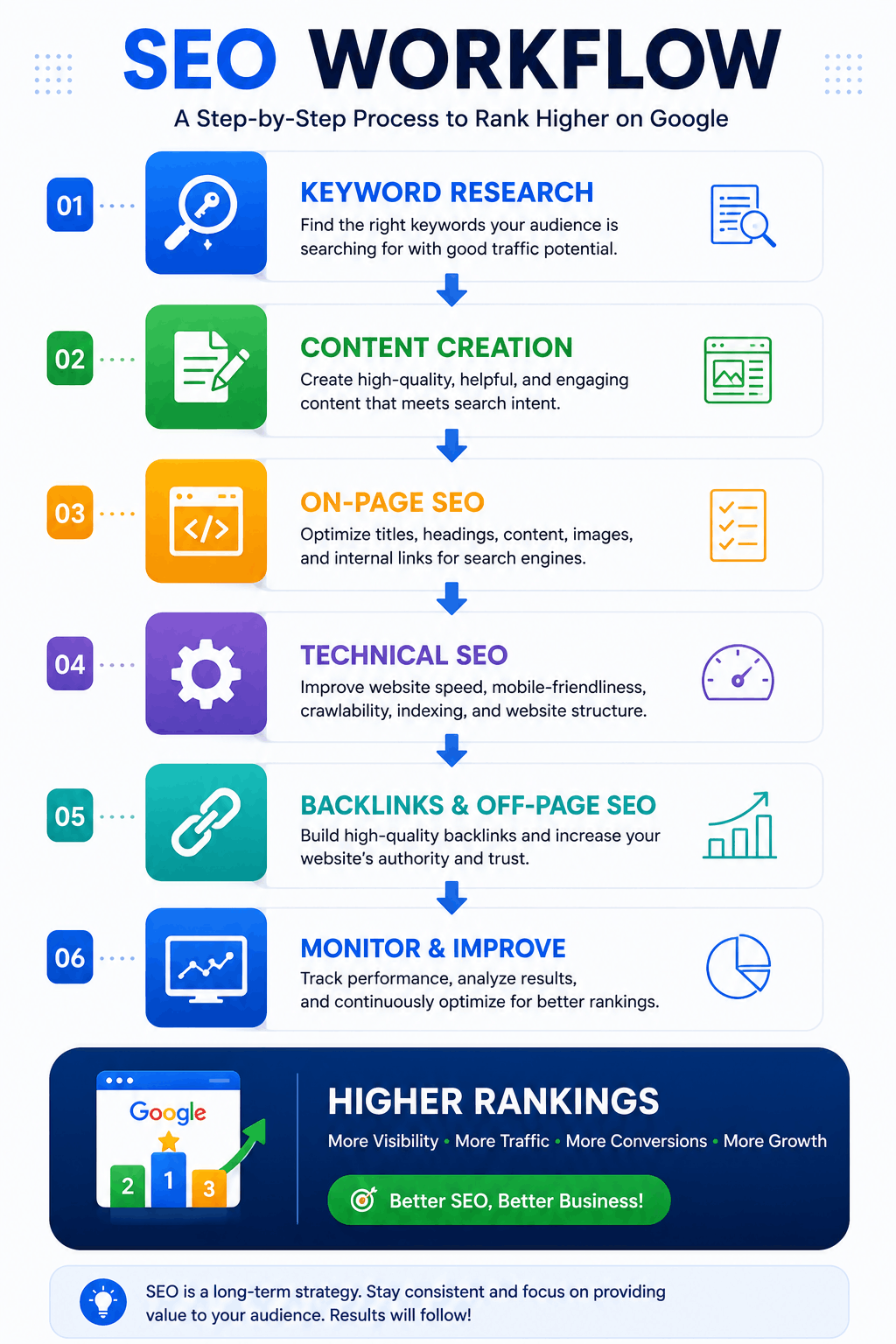
Most Important SEO Ranking Factors
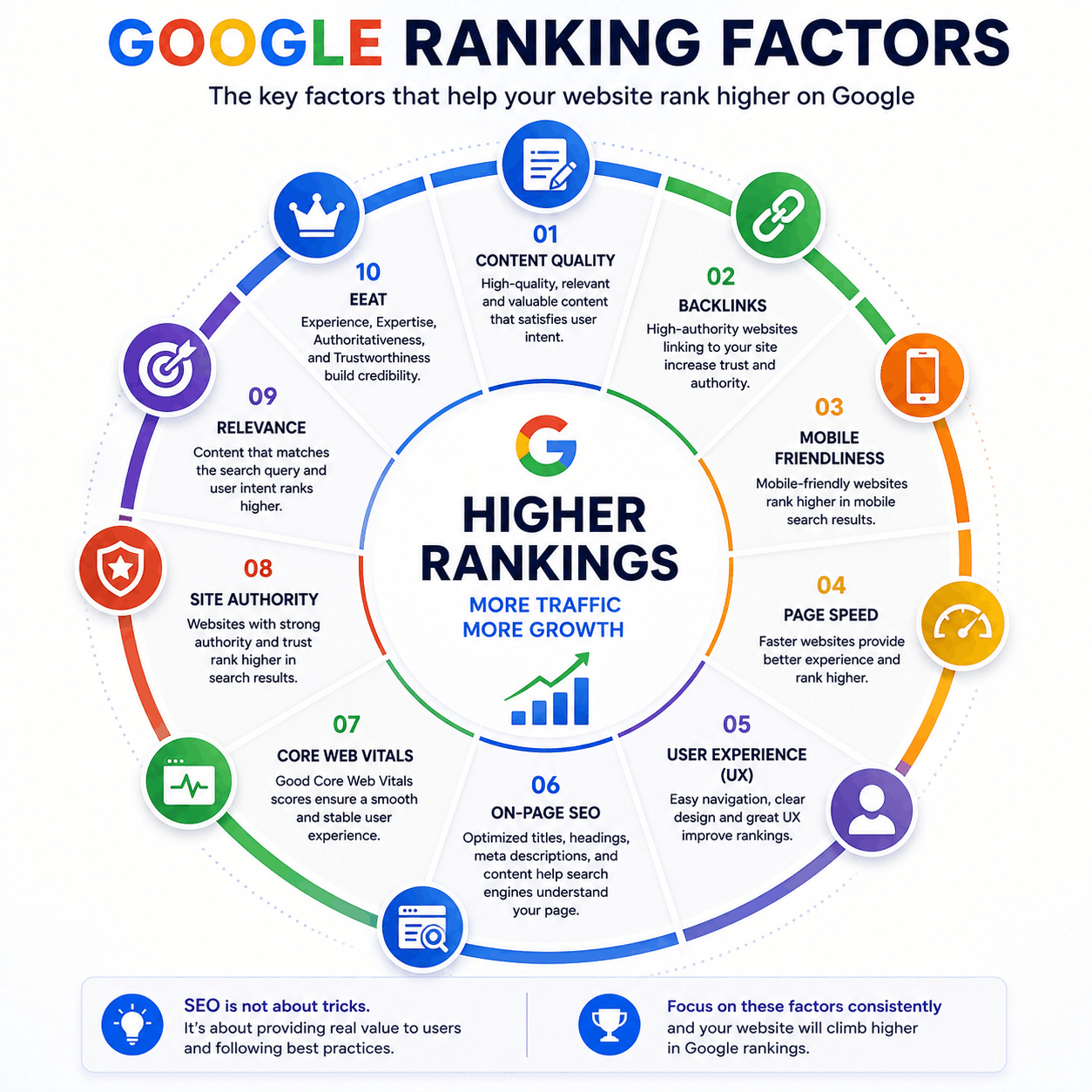
While Google's full algorithm remains private, years of testing and official Google statements have made certain ranking factors clear. Here are the ones that consistently matter most:
- Content Quality & Relevance — Does your page thoroughly and accurately answer the search query?
- Search Intent Match — Does your content match what the searcher actually wants?
- Backlinks — How many quality, relevant websites link to your page?
- Core Web Vitals — How fast and smooth is the page experience?
- Mobile-Friendliness — Does the site work well on phones, where most searches now happen?
- HTTPS Security — Is the connection to your site secure?
- User Experience Signals — Do people stay on your page, or bounce back immediately?
- Keyword Usage — Is the target keyword used naturally in the right places?
- Content Freshness — Is the information current and regularly updated?
- Schema Markup — Structured data that helps search engines understand your content more precisely, sometimes unlocking rich results like star ratings or FAQs directly in search results.
Common SEO Mistakes Beginners Make
Almost everyone makes these mistakes when starting out. Recognizing them early saves months of wasted effort.
Learning this properly, with real guidance instead of trial and error, makes a genuine difference here. If you want structured, hands-on training rather than piecing it together from articles, our digital marketing courses cover SEO alongside Meta Ads, Google Ads and AI tools in 7, 22 or 45 days.
Best SEO Tools
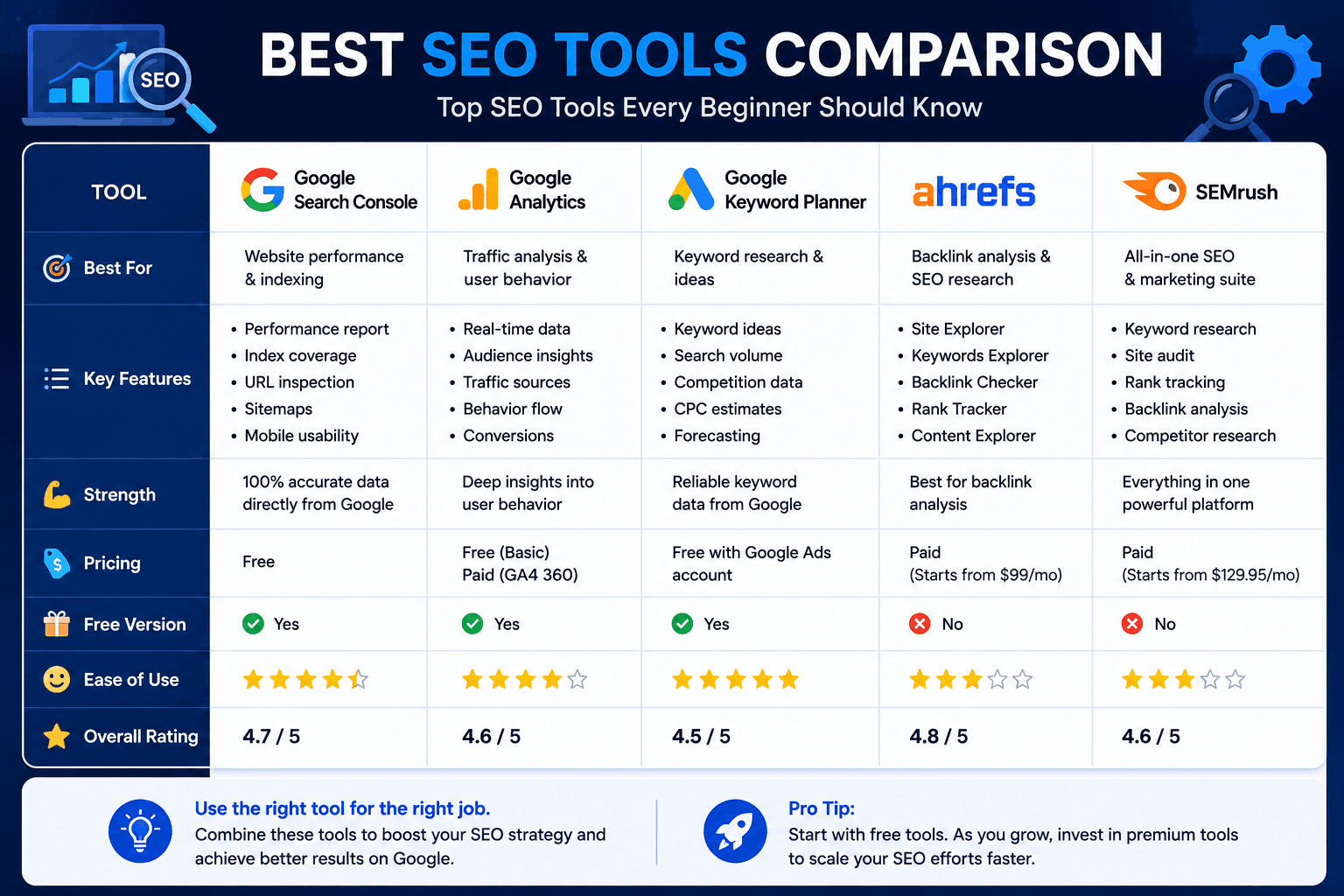
You don't need every tool on this list to get started, but these are the ones professionals rely on daily.
| Tool | Best For | Free or Paid |
|---|---|---|
| Google Search Console | Monitoring indexing, clicks, impressions, technical issues | Free |
| Google Analytics | Understanding visitor behavior and traffic sources | Free |
| Google Keyword Planner | Researching keyword search volume | Free (Google Ads account) |
| Ahrefs | Backlink analysis and competitive research | Paid |
| Semrush | All-in-one SEO, content, and competitor tracking | Paid |
Beginner SEO Checklist
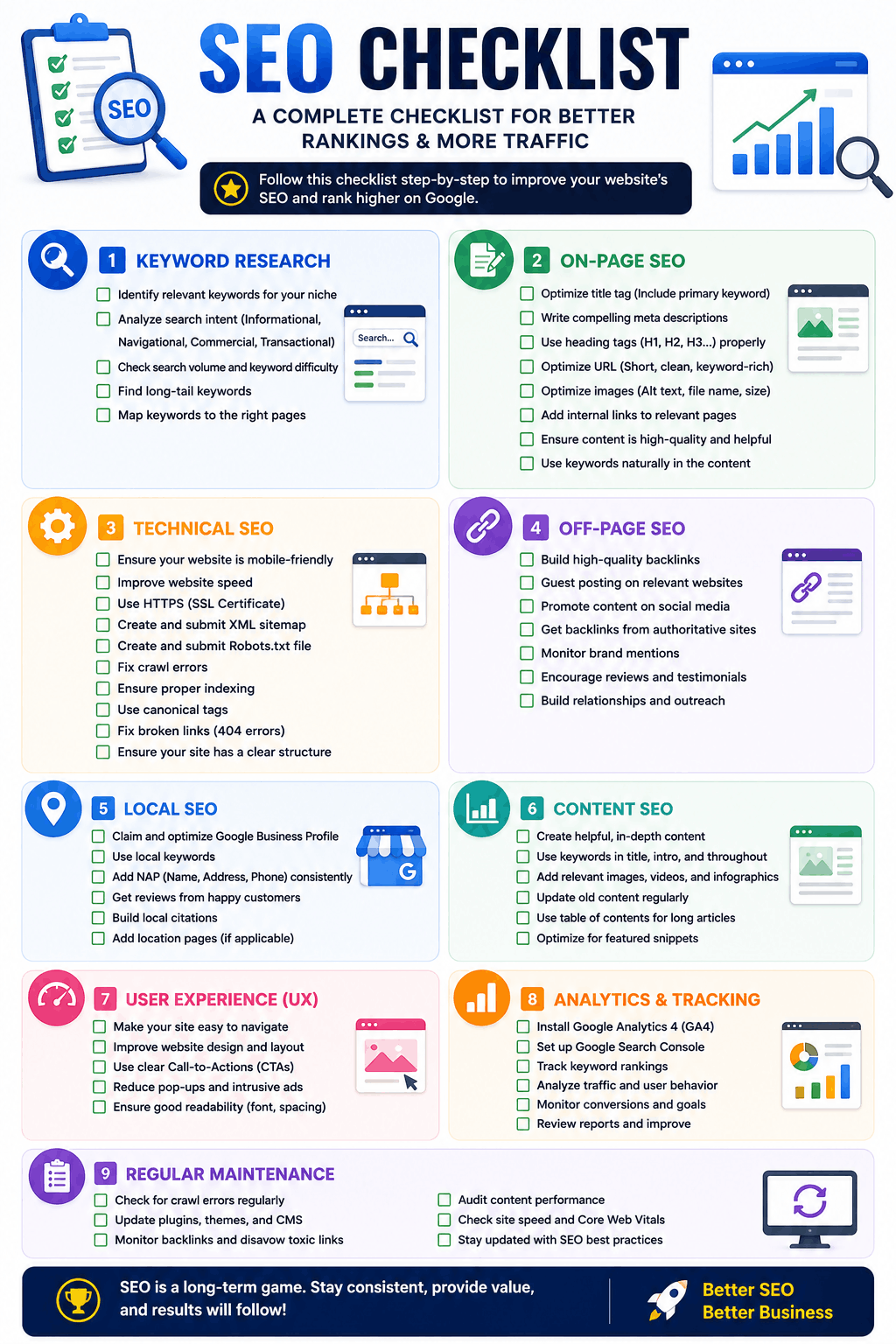
Use this as your practical starting point:
- Set up Google Search Console and submit your sitemap
- Connect Google Analytics to track visitors
- Do basic keyword research for your main pages
- Write unique, keyword-relevant titles and meta descriptions for every page
- Use one clear H1 per page, with logical H2/H3 structure below it
- Add descriptive alt text to every image
- Make sure your site loads quickly and works well on mobile
- Fix any broken links or missing pages
- Add internal links between related pages on your own site
- Set up your Google Business Profile if you have a local business
- Publish genuinely helpful, original content — not thin or copied pages
- Start building a few genuine backlinks from relevant, trustworthy sites
Ready to Improve Your Google Rankings?
📈 Explore SEO ServicesWant to Learn SEO Yourself, Not Just Hire It Out?
Everything in this checklist — and a lot more — is exactly what we teach hands-on in our digital marketing courses. Real campaigns, real tools, real results, in 7, 22 or 45 days.
🎓 Explore Our Digital Marketing CoursesFrequently Asked Questions
SEO (Search Engine Optimization) is the practice of improving your website so it shows up higher in search engine results, like Google, without paying for ads. It involves better content, technical improvements, and building trust and authority online.
Most websites start seeing meaningful results within 3 to 6 months, though this varies based on competition, content quality, and how new the domain is. SEO is a long-term strategy, not an overnight fix.
The tools to do SEO (like Google Search Console) are often free, but SEO itself requires real time investment — or paying someone to do that work for you. It's "free" in the sense that you don't pay per click, unlike ads.
SEO focuses on earning organic (unpaid) rankings, while SEM (Search Engine Marketing) typically refers to paid search ads. Many businesses use both together for faster and more sustainable results.
No. Basic SEO — content, keywords, structure — requires no coding at all. Technical SEO can benefit from some HTML/website knowledge, but many tools and plugins handle this without needing to write code yourself.
A keyword is the specific word or phrase people type into a search engine. SEO involves researching which keywords your audience actually searches for, then creating content that answers those searches well.
Backlinks are links from other websites pointing to yours. They act as a trust signal to Google — the more quality, relevant sites that link to you, the more authoritative your site appears.
Basic SEO is very learnable for beginners and small business owners. However, competitive industries or larger websites often benefit from professional help to save time and avoid costly mistakes.
On-page SEO is everything you control directly on your website (content, structure, keywords). Off-page SEO refers to external factors like backlinks and brand mentions that build trust from outside sources.
This is usually an indexing issue. Check Google Search Console to confirm your pages are actually indexed — a brand-new site can sometimes take days to weeks to be discovered and indexed for the first time.
Conclusion: What Is SEO, in Summary
SEO isn't a secret formula or a one-time trick — it's the ongoing practice of making your website genuinely easier to find, more useful, and more trustworthy, both to search engines and to real people. It touches everything from the words on your page to the speed of your server to the number of other sites that vouch for you.
The good news: you don't need to master everything at once. Start with the beginner checklist above, be patient with the timeline, and build from there. Every well-ranked website you see today started exactly where you are right now.
Let's Grow Your Business Online
AEZTIQ provides professional SEO services, website optimization, technical SEO, content strategy, and complete digital marketing solutions to help businesses increase organic traffic and generate more leads.
Contact AEZTIQ Today
Johns Kuriakose
Digital Marketing StrategistSpecializes in SEO, Google Ads, Meta Ads, Website Development, and AI-powered marketing — helping businesses improve organic visibility, generate quality leads, and build sustainable online growth.